Overview
Welcome to The Burn Contributor's Book 👋
This book will help you get acquainted with the internals of the Burn deep learning framework and provide some detailed guidance on how to contribute to the project. Before opening a PR, please read the Contributing Guidelines.
We have crafted some sections for you:
-
Getting Started: Much like the Burn Book which targets users, we'll start with the fundamentals, guiding you through tasks like setting up the development environment, running tests, and what you should check prior to each commit.
-
Project Architecture: This section will give you an in-depth look at the architecture of Burn.
-
Guides: We provide some guides on how to do specific tasks, such as adding a new operations to Burn.
-
Frequently Encountered Issues: If you are running into an issue that has you stumped, this is the section to check out prior to asking on the Discord. It's a collection of errors encountered by contributors, what caused them, and how they were resolved.
As this book is geared towards contributors and not towards users of Burn, we'll assume you have a good understanding of software development, but will make efforts to explain anything outside of that scope, or at least provide links to resources that explain it better than we can.
How to read this book
Throughout this book, we maintain the following structure.
Linking
When referring to structures or functions within codebase, we provide permalinks to the lines in
specific commits, and indicate them by the relative path of their parent file from the project root.
For example this is a reference to the Tensor struct in
crates/burn-tensor/src/tensor/api/base.rs
When some reference information is useful but is beyond the scope of contributing to Burn, we
provide that information in a footnote. To build on the previous example, the Tensor mentioned is
what's referred to as a newtype struct1.
Direct hyperlinks are for tools and resources that are not part of the Burn project, but are useful for contributing to it. For example, when working on implementing an operation for autodiff, it can be useful to use symbolab to calculate the left and right partial derivatives.
-
For more information on newtype please refer to the Advanced Types chapter of the Rust Book ↩
Getting Started
This section is for setting up the environment and how to do basic development tasks such as running tests and checking your code before committing. If you need help with the process or run into issues, feel free to ask on the Discord server in the Development channels.
Setting up the environment
Depending on what part of the project you plan on contributing to, there are a couple of tools to install and commands to be familiar with.
General
During development, these commands can automatically address common formatting and lint issues:
cargo fmt --allrunsrustfmton all files in the project.cargo clippy --fixruns Clippy and applies fixes for supported lint findings. It requires a clean Git state unless you pass--allow-dirty.
Before submitting a PR, run:
cargo run-checks
This is the common local validation command. It runs, in order:
- formatting checks;
- typo checks;
- a dependency audit;
- Clippy across the workspace;
- a quick host no-std compilation check; and
- backend tests in release mode using the Flex backend.
If your changes target another backend, override the default:
cargo run-checks --backend <backend>
The command is intended as a fast common baseline rather than the entire CI test matrix. You should also run tests relevant to the crates changed. CI runs the broader workspace, documentation, platform, feature, and backend combinations.
Want more detailed macro error diagnostics? This is especially useful for debugging tensor-related tests:
RUSTC_BOOTSTRAP=1 RUSTFLAGS="-Zmacro-backtrace" cargo run-checks
Updating the burn semver version
If for some reason you need to bump for the next version (though that should probably be left to the
maintainers), edit the semantic version number in burn/Cargo.toml, and then run cargo update to
update the lock file.
Contributing to either the Burn Book or Contributor Book
Both the Burn Book and the Contributor Book are built with mdBook. From the repository root, use the xtask commands to build them. These commands install mdBook if needed:
cargo xtask books burn build
cargo xtask books contributor build
To serve a book locally and open it in your browser:
cargo xtask books burn open
cargo xtask books contributor open
Run the command for the book you want to preview. Add --port 3000 to choose a port; otherwise,
xtask selects one automatically.
Alternatively, if you want to install mdbook directly, run the following command1:
cargo install mdbook
For documentation-only changes, you can run cargo xtask check typos to check for misspellings
without running the full local validation. This installs
typos when needed. To apply suggested corrections to a book,
run typos -w /path/to/book.
-
You might also want to install cargo-update to easily keep your tools up to date, though it is in no way required. ↩
Configuring your editor
These steps are not required, and most of this isn't specific to Burn, but it's definitely helpful if you haven't already done it.
VSCode
Install the following extensions:
- rust-lang.rust-analyzer for Rust syntax and semantic analysis
- tamasfe.even-better-toml for TOML syntax and semantic analysis
- fill-labs.dependi for managing dependencies
- vadimcn.vscode-lldb for debugging
Setting up the Debugger
To use the debugger, follow these steps:
- Open
Command PalettewithCtrl+Shift+PorF1and typeLLDB: Generate Launch Configurations from Cargo.tomlthen select it, this will generate a file that should be saved as.vscode/launch.json. - Select the configuration from the "run and debug" side panel, then select the target from the list.
Since this repo has
debug = 0in the rootCargo.tomlto speed up compilation, you need replace it withdebug = truein the rootCargo.tomlwhen using a debugger and breakpoints withlaunch.jsonsettings. - Now you can enable breakpoints on code through IDE then start debugging the library/binary you want, like in the following example:
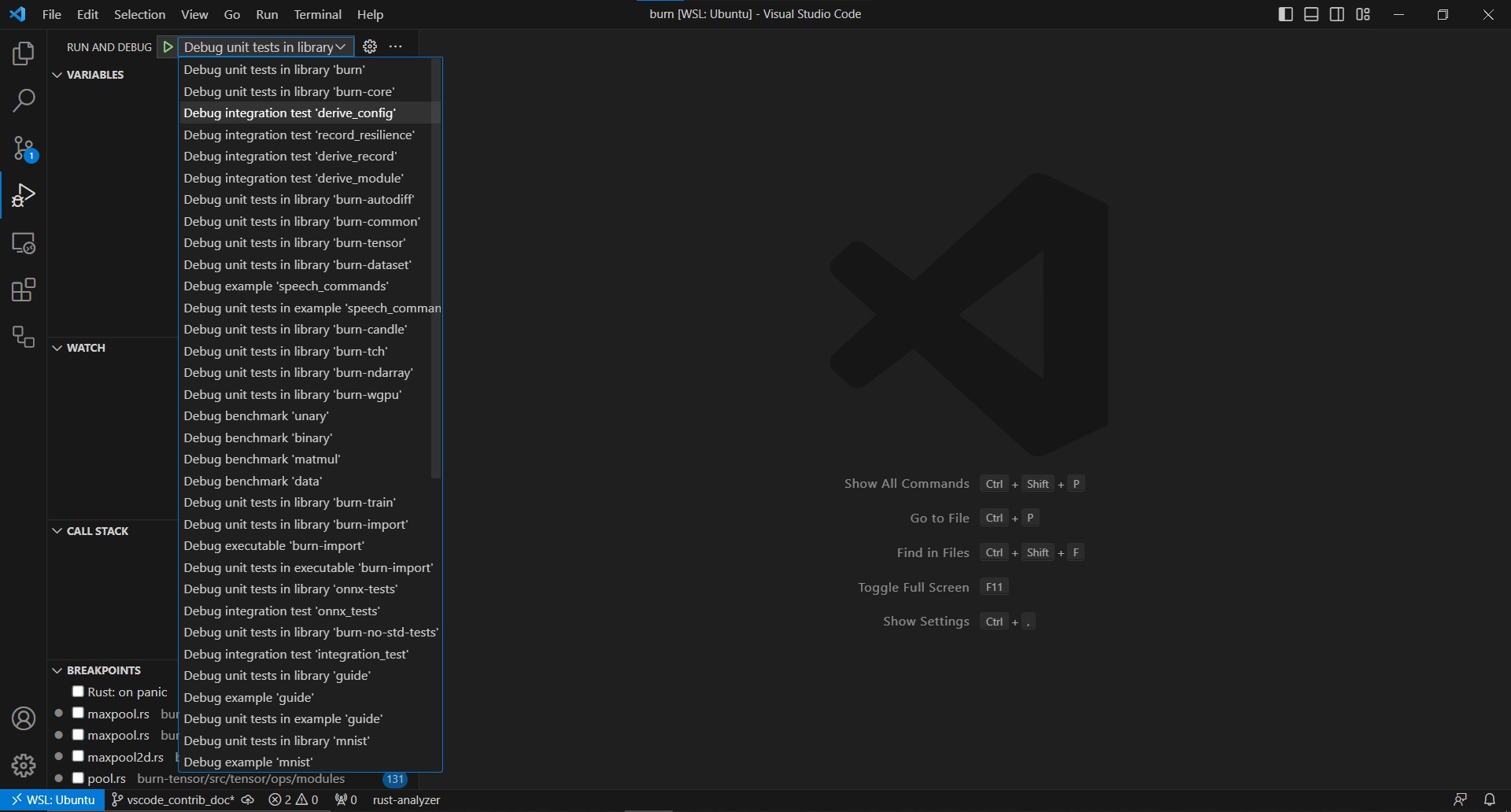
If you're creating a new library or binary, keep in mind to repeat step 1 to always keep a fresh list of targets.
Have another editor? Open a PR!
Testing
Tensor operations
Shared tensor tests live in
crates/burn-backend-tests/tests/tensor.
Register new test modules in the corresponding mod.rs or tests/common/tensor.rs. The test
executables reuse those modules across precisions; backend features select which runtime to test.
Backend-specific implementation tests also live alongside the backend code.
Run the relevant shared suites using the backend aliases defined in
crates/burn-backend-tests/.cargo/config.toml.
Start from the repository root and change into the crate directory so Cargo discovers its aliases:
cd crates/burn-backend-tests
cargo test-flex --test tensor
cargo test-flex --test autodiff
These aliases run in release mode and select the backend features explicitly. Omit --test to run
all test targets for that configuration, or append a test-name filter to narrow the run:
cargo test-flex
cargo test-flex --test tensor matmul
Choose the alias for the backend you are changing, such as cargo test-cuda, cargo test-vulkan,
or cargo test-metal. Aliases for backends that support fusion enable it by default; their
-no-fusion variants test without fusion. For example, run both configurations when changing CUDA
operations or fusion behavior:
cargo test-cuda --test tensor
cargo test-cuda-no-fusion --test tensor
From the repository root, use cargo run-checks for the repository validation workflow. It defaults
to Flex; select another backend with cargo run-checks --backend <backend> when working on
backend-specific code.
Autodiff
Shared backward tests live in
crates/burn-backend-tests/tests/autodiff
and are registered through tests/common/autodiff.rs. Graph engine unit tests also live in
burn-autodiff. For operations with multiple differentiable inputs, verify every input gradient.
Choose small inputs whose derivatives can be calculated independently. Create source leaves on an
autodiff device and call require_grad() before the forward pass. Retrieve their gradients from the
result of backward(). Check broadcasting and untracked inputs where relevant; a numerically
correct forward pass does not establish a correct backward implementation.
You can also use PyTorch as a reference implementation to obtain expected outputs and gradients for Burn tests. For example, this small broadcasting case checks gradients for both operands:
import torch

x = torch.tensor([[1., 2.], [3., 4.]], requires_grad=True)
y = torch.tensor([5., 6.], requires_grad=True)
output = x * y
output.sum().backward()

print(output.detach().tolist())  # [[5.0, 12.0], [15.0, 24.0]]
print(x.grad.tolist())           # [[5.0, 6.0], [5.0, 6.0]]
print(y.grad.tolist())           # [4.0, 6.0]
Use the same inputs, operation parameters, and reduction in the Burn test, and record these values
as expected data so the test does not depend on PyTorch. Here, the gradient for y sums
contributions over the broadcast dimension. For other operations, check that the reference uses
matching semantics and dtypes, and compare with an appropriate tolerance as described below.
Precision
Shared suites define FloatElem and IntElem aliases for each test executable and configure the
device defaults before creating tensors. They are not associated types of a TestBackend. Use the
aliases in expected data and use .elem() when a literal needs conversion.
For approximate floating-point comparisons, follow nearby tests:
actual.into_data().assert_approx_eq::<FloatElem>(&expected, Tolerance::default());For integers, use IntElem and skip cases whose inputs cannot be represented by the selected dtype.
Exercise additional precision targets when the change depends on dtype or numerical stability.
Project Architecture
This section documents most major architectural decisions with the reasoning behind them.
Sections
Module
Modules organize parameters into structures that can be optimized, saved, and loaded.
#[derive(Module)] generates parameter traversal and training/validation conversions. A module does
not force the declaration of the forward pass, leaving it up to the implementer to decide how it
should be defined.
Configuration describes a module's structure and hyperparameters; records store its parameters separately.
Parameters and traversal
Param<T> gives a value an identity and supports lazy initialization. Tensor parameters use that
identity to associate optimizer state and gradients. Param<Flag> represents module-owned control
state, such as whether dropout or batch normalization behaves as during training.
Module::visit inspects parameters; Module::map transforms them. Visitors and mappers have hooks
for float, integer, and boolean tensors, control flags, and module paths. Reparameterizations such
as LoRA have nested parameters that participate in these traversals. param.base() reads the stored
base; param.val() materializes the effective value, including a reparameterization.
Training and validation
Module includes the valid(&self) and train(self) transition hooks; the derive generates both
alongside traversal. Training and validation use the same module type, and a module can contain
parameters with different runtime autodiff contexts.
valid(&self)creates a validation snapshot with autodiff and training flags disabled. It keeps configured trainability and flag settings, folds reparameterizations into parameter values, and removes checkpointing strategies with the autodiff association.train(self)enables autodiff and applies configured trainability and flags. It does not undo explicit freezing, reconstruct folded adapters, or restore discarded checkpointing strategies.no_grad()persistently disables parameter gradients while leaving control flags unchanged.freeze()andunfreeze()configure both gradients and flags; group variants target subtrees.
Keep the training module and use its valid() snapshot for validation. Inspect individual tensors
with is_autodiff(), is_tracked(), and is_require_grad() rather than inferring training state
from the trait or module.devices(). Device equality ignores autodiff settings, and the latter
method deduplicates compute resources.
Optimization
Optimizer
updates one tensor at a time from its gradient and optional state. State<D> implements Clone and
RecordState, allowing tensors and scalars to be serialized independently of backend types.
ModuleOptimizer
wraps these optimizers and manages module traversal, parameter groups, gradient lookup, device
migration, and per-parameter state. Parameter groups can use different optimizers.
An update proceeds as follows:
- Run the model and call
loss.backward(). - Convert the tensor gradients with
GradientsParams::from_grads(grads, &model). - Call
optimizer.step(learning_rate, model, grads)to obtain the updated module.
The optimizer performs updates outside the autodiff graph and restores parameter trainability and
checkpointing strategy afterward. A transferred tracked parameter is an intermediate, so use
model.fork(&device) when the destination module should have independently optimizable leaves. Both
to_device and fork preserve source autodiff context; use train() to enable it explicitly.
See the serialization chapter for ModuleRecord and OptimizerRecord.
Serialization
An important aspect of a deep learning framework is the ability to save and load training state to
and from disk. Burn serializes its records with the burnpack format, a compact binary container
implemented by the burn-pack crate.
Constraints
-
Users should be able to add any field to a module, even fields that are not serializable.
This can include constants, database connections, other module references, or any other information. Only the parameters (tensors) should be serialized; the structure of the module itself is encapsulated by its configuration (hyperparameters).
-
Records should be decoupled from the backend in use.
A record holds plain tensor data (
TensorData), so weights saved with one backend can be loaded on another. Parameter initialization is lazy, so loading a record does not require eagerly materializing the module first. -
The format should be fast to load and embeddable.
Tensor data is stored contiguously and aligned, so it can be read back with zero-copy / memory-mapped loading, and a record can be saved straight to bytes for
no-stdenvironments.
The burnpack format
The burn-pack crate is intentionally minimal and tensor-library-agnostic: it knows how to read and
write the container format but has no notion of Burn modules. A burnpack file has three parts:
┌────────────────────────────────────────────────────────────┐
│ Header (fixed size)                                          │
│   magic "BURN", format version, metadata byte length         │
├────────────────────────────────────────────────────────────┤
│ Metadata (CBOR)                                              │
│   tensors : map<name, descriptor>                            │
│     dtype, shape, data_offsets, optional param_id            │
│   scalars  : map<name, typed scalar>                         │
│   metadata : map<string, string>  user key/value pairs       │
├────────────────────────────────────────────────────────────┤
│ Tensor data section                                          │
│   each tensor's bytes start on a 256-byte boundary so the    │
│   data can be sliced zero-copy / memory-mapped from a file   │
└────────────────────────────────────────────────────────────┘
All multi-byte integers are little-endian. Tensor entries carry an optional param_id used to
preserve a parameter's identity across save/load. Besides tensors, a pack can store named typed
scalars (integers, floats, booleans), which the optimizer and learning rate scheduler records use
to persist their non-tensor state.
A pack is read back with burn_pack::Reader, which yields burn_pack::Tensor entries plus a scalar
map. Tensor bytes stay lazy: a file-backed reader only touches the disk when an entry's data is
actually used.
A pack is written with burn_pack::Writer, which is symmetric about this, because laziness is a
property of Tensor rather than of the writer's input. Tensor::new carries bytes that are already
resident; Tensor::deferred carries a byte length plus a provider that yields the data on demand.
The writer reads only the metadata while planning, to compute every descriptor and offset before any
I/O, then calls each provider once in write order, dropping each tensor's bytes before requesting
the next. burn-store collects a module's parameters as deferred tensors, so each device readback
waits until the writer reaches that tensor. Paired with
Writer::write_to_file, which streams to disk, saving a large module costs one tensor of host
memory at a time rather than the whole set. The in-memory sinks (into_bytes, write_into) still
build the container as a whole.
Because the offset table is committed from the declared length before the bytes exist, a length that
turns out to be wrong would misplace every later tensor. Two checks prevent that: planning rejects a
length that disagrees with the tensor's own shape and dtype, and the write pass rejects bytes whose
length differs from what was reserved. Quantized tensors are exempt from the first, since their
packed values and inline scales are not a product of shape and dtype; that exception is why
Tensor::deferred takes an explicit length rather than deriving one.
Writer::write_to_file builds the container in a scratch file beside the destination and renames
it into place only once it is complete, so a save that fails partway leaves whatever was already at
that path untouched. That covers disk failure (a full disk, a quota, an I/O error) for every caller,
and provider failure for deferred tensors, whose bytes are produced mid-write.
Writer::write_to_file_in_place truncates and rewrites the destination instead: it skips the fsync
and the transient second copy, but a failed save leaves a truncated file.
The three record types
Higher layers bridge their state to and from burnpack through three record types. Each one can be
serialized to a file (save / load, appending the .bpk extension when the path has none) or to
an in-memory byte buffer (into_bytes / from_bytes).
ModuleRecord (burn-core, burn::store)
Holds a module's parameters: a flat list of (path, ParamId, TensorData) entries keyed by module
path. It is produced and applied through the Module trait itself rather than a separate codegen
type:
module.into_record()walks the module with aModuleVisitor(theCollector), recording each float/int/bool parameter under its dotted path.module.load_record(record)(or the fallibletry_load_record) walks the module with aModuleMapperthat looks each parameter up by path and loads the matching tensor.
Load-time behavior is configured with builder methods on the record, ignored when saving:
allow_partial(bool)— tolerate module parameters absent from the record.validate(bool)— toggle shape-mismatch / missing-tensor validation.with_dtype_policy(..)/cast_to_module_dtype()— choose whether a parameter adopts the record's dtype (DTypePolicy::FromRecord, the default) or casts the data to the module parameter's current dtype (DTypePolicy::CastToModule).
The save-side dtype is not configurable: the record stores whatever dtype the module currently
holds. The dtype applied on load is controlled by the record's DTypePolicy
(.cast_to_module_dtype() / .with_dtype_policy(..)).
This module in burn-core is intentionally tiny — no filtering, key remapping, or adapters. The
richer snapshot/import tooling (filtering, key remapping, PyTorch/SafeTensors cross-framework stores)
lives in the burn-store crate.
OptimizerRecord (burn-optim)
Holds an optimizer's per-parameter state. Unlike a module record (keyed by module path), it is keyed
per parameter: each parameter's state is decomposed into tensors named "{param_id}.{field}" plus a
few typed scalar entries kept in the burnpack scalar map (including a __rank scalar so the state
can be reconstructed without inferring rank from tensor shapes).
optimizer.to_record()flattens each parameter'sDynStateinto tensors and scalars.optimizer.load_record(record)reconstructs the states (no device argument: tensors load on the default device and migrate to each parameter's device on the next step).
LrSchedulerRecord (burn-optim)
Holds a learning rate scheduler's state, which is just a handful of scalars (step counters, current
learning rate) and no tensors. Produced/applied through the LrScheduler trait's to_record() /
load_record(). Composed schedulers nest their children's records under an index prefix
(with_record / record).
Checkpointing in burn-train
During training, burn-train defines a Checkpoint trait (save(path) / load(path)) implemented
for all three record types — ModuleRecord, OptimizerRecord, LrSchedulerRecord — and for ()
(a stateless no-op). The Checkpointer<R: Checkpoint> trait drives periodic saves; the
FileCheckpointer writes each record to {name}-{epoch}.bpk under the experiment directory. This is
how the model, optimizer, and scheduler are persisted and restored across epochs.
Notes
- There is no
Recorder,PrecisionSettings,Module::Recordassociated type, or#[derive(Record)]any more. All of those were part of the previous serde-based record system, which has been removed. - Cross-framework import/export (PyTorch
.pt, SafeTensors) still lives inburn-store(PytorchStore,SafetensorsStore,BurnpackStore).
Tensor
The public tensor type is Tensor<const D: usize, K = Float>: D is its rank and K is Float,
Int, or Bool. Backend and element precision are runtime properties, selected through Device
and DType. Models and tensor functions do not have a backend generic parameter.
From backend generics to runtime selection
Previously, Tensor<B, D, K> carried the backend in its Rust type. Model fields and functions
propagated B: Backend, and selecting another backend instantiated that generic code for another
backend type. The current API keeps rank and kind in the type while moving backend selection to
runtime values. The same Tensor<2> type can represent a tensor on Flex, CUDA, or WGPU.
Cargo features determine which backends are compiled into an application. A Device selects the
compute resource and supplies creation settings; existing tensors carry the information needed to
route subsequent operations. Multiple enabled backends can be used side by side, with the same model
code targeting each of them. There is no single process-wide backend that every tensor must use.
Combining tensors still requires compatible devices; transfers are explicit.
The Backend trait remains the implementation contract below dispatch. Concrete backends and
decorators such as Autodiff<B, C> and Fusion<B> still compose using backend types. The change
moves those types out of ordinary application signatures and into the implementation layers.
Tensor Operations
Operations follow this path:
Tensor<D, K> → BridgeTensor → DispatchTensor → backend primitive
The layers have distinct responsibilities:
burn-tensor/src/tensor/apidefines the rank- and kind-checked API, shape checks, and user documentation.base.rscovers common operations,numeric.rscovers numeric kinds, andfloat.rs,int.rs, andbool.rscontain kind-specific operations. Activations and neural-network operations also have function APIs intensor/activationandtensor/module.rs.burn-tensor/src/bridgestores tensor primitives opaquely and implements kind-specific forwarding. Thin generic methods call non-generic helpers takingBridgeTensor, so downstream monomorphization does not repeatedly resolve the backend implementation types. Follow the*_implpattern described in theburn-tensorcrate documentation when adding operations.burn-dispatchselects a backend from runtime tensors and devices. It also routes autodiff and checkpointing contexts. Built-in forwarding uses#[backend_dispatch]; extensions use#[backend_extension].burn-backenddefinesBackendTypes,Backend, and operation traits implemented by concrete backends and decorators. These low-level APIs still use backend generics and tensor primitive aliases.
A new kernel operation may need changes at every layer. An operation expressed entirely in terms of existing tensor operations may need only a public composition. See Adding a New Operation.
Why the bridge is opaque
Runtime selection and type erasure solve different problems. DispatchTensor represents runtime
selection with an enum containing the concrete primitives of the enabled backends, plus autodiff
context. Putting that enum directly into the public Tensor would still expose its nested backend
types to the compiler when compiling downstream code.
Instead, Tensor stores a BridgeTensor. Its private BridgeTensorVariant distinguishes float,
integer, boolean, and quantized float values, each holding a dispatch tensor. That variant lives
inside aligned opaque storage generated by burn_std::obfuscate!. The public Device similarly
hides its DispatchDevice representation. These wrappers erase the concrete field types at the
public boundary; unwrapping them does not itself transfer tensor data between devices.
Rust specializes generic tensor methods for the ranks and kinds used by an application. To keep
that work small, these methods pass opaque BridgeTensor handles to non-generic bridge methods
or *_impl helper functions. Those functions contain the calls into dispatch and are compiled
once in burn-tensor. This lets application code specialize the thin public methods without
repeatedly compiling the dispatch logic or resolving the concrete backend types behind it.
When adding operations, preserve both boundaries: keep backend primitives behind the opaque
representation and outline dispatch-facing work into non-generic functions. See the
burn-tensor contributor notes
for the helper pattern.
Following an addition through the stack
For an ordinary floating-point lhs + rhs, the path is:
- The operator implementation calls
Tensor::addintensor/api/numeric.rs. The public method checks shape compatibility and forwards the two bridge handles to the numeric operation for their kind. - The
Floatimplementation inbridge/ops/float.rsunwraps the bridge values and callsDispatch::float_add. This layer also handles the distinct paths for quantized float operands. - The implementation in
burn-dispatch/src/ops/tensor.rsuses#[backend_dispatch]to generate routing to the selected backend'sB::float_add. Routing uses the runtime tensor variants and autodiff context; it does not pick a new device for each operation. Creation operations instead dispatch from their supplied device. - The selected backend or decorator handles the primitive operation. Autodiff can record backward steps and fusion can defer execution while collecting operations. Reaching this layer does not necessarily launch a kernel immediately.
- The returned primitive is wrapped into a dispatch tensor, then a bridge tensor, then the public
Tensor<D, Float>result.
CUDA, ROCm, WGPU, and the CubeCL CPU runtime share the Cube dispatch variant. Within that backend,
the tensor's device and runtime client select the runtime. Other backends, such as Flex, have their
own dispatch variants. See Backend for the primitive contract and decorators.
Static and runtime checks
Rank and tensor kind remain compile-time API properties. Shapes, dtypes, device compatibility, and
autodiff association are runtime properties. In particular, a public Tensor<D> type no longer
proves B: AutodiffBackend; when the autodiff feature is enabled, backward() validates graph
participation at runtime. Backend extension code can still use backend trait bounds below the public
boundary.
Ownership and autodiff
Tensor handles can be cloned and sent across threads. Operations usually take owned tensors, which lets a backend reuse storage when no other handle references it. Cloning a handle does not imply a copy of its allocation, nor does it copy an autodiff tape.
Devices provide defaults for newly created tensors; each tensor retains its own autodiff context.
to_device preserves the source context and records a differentiable transfer for tracked floats.
Use autodiff or without_autodiff to change association explicitly. Graph participation, gradient
retention, and whether recorded backward steps are still available are distinct concepts; see the
Burn Book autodiff chapter.
Backend
The low-level Backend trait defines the implementation contract for tensor operations. Its
BackendTypes supertrait supplies device, float, integer, boolean, quantized tensor, and captured
graph primitive types. Backend implementations and decorators remain generic where useful;
application tensors and modules select them at runtime through Device.
See Tensor for the Tensor → Bridge → Dispatch → Backend path.
Element types
Precision is a runtime property. BackendTypes no longer has associated FloatElem or IntElem
types. Tensor primitives expose their dtype through metadata, and operations accept dtype or scalar
information as needed.
Users can configure default dtypes with Device::configure(DeviceConfig::default()...) before
creating tensors, request an explicit dtype when creating a tensor, or call tensor.cast(...).
Device settings are initialized once; creating the first tensor uses the backend's defaults if
configuration has not happened earlier. A backend reports which dtypes it supports through
supports_dtype. See the Burn Book's
Device Settings section
for configuration and per-tensor dtype examples.
Do not assume every backend supports every precision. Backend kernels should handle the dtypes they
advertise, and shared tests use the test target's FloatElem and IntElem aliases.
Operations
Backend operations are associated functions taking and returning primitives. Backends may enqueue work asynchronously and reuse uniquely owned storage. The public tensor API handles user-facing shape checks, while the bridge and dispatch layers route to the appropriate primitive operations.
CubeCL runtimes share burn_cubecl::CubeBackend; the device selects CUDA, ROCm, WGPU, or CPU.
burn_cubecl::Cube wraps that backend with Fusion when the fusion feature is enabled. Runtime
facade names such as Cuda and Wgpu are aliases of Cube, not distinct extension selectors.
Runtime dispatch uses a fixed backend catalog defined in
crates/burn-backend-extension/src/catalog.rs, shared by generated and handwritten routing.
#[backend_extension] extends the operations available on supported backends; it does not provide a
mechanism for registering additional backends.
Autodiff
burn_autodiff::Autodiff<B, C> decorates a backend with first-order reverse-mode differentiation,
where C is a checkpoint strategy. The low-level AutodiffBackend trait defines backward and
gradient access. At the public API, autodiff is a runtime context carried by tensors and supplied as
a creation default by devices.
Enabling autodiff does not automatically track every input. Source leaves use require_grad();
operations depending on tracked inputs record backward steps. Backward consumes reachable steps,
including steps shared by cloned handles. Repeated backward through consumed intermediates is
rejected; parameter leaves can be reused in fresh forwards.
#[backend_extension(Autodiff, Cube)] generates runtime routing for an extension. The author still
supplies its implementation for Autodiff<B, C> (a composition of differentiable operations or a
custom backward pass). See the
extension guide.
When writing a custom backward pass, obtain input NodeGuards with AutodiffTensor::node() or
into_parts() and pass them to Backward::prepare. They must stay alive through child-step
registration, but must not be stored in backward or checkpoint state. Access the primitive with
primitive() or into_parts(); the old public fields are private.
Guides for Contributors
The following guides are meant to help contributors accomplish specific tasks, such as adding new operations to Burn.
Adding a New Operation to Burn
Choosing where the operation belongs
First consider the operation's intended users and scope:
- General-purpose tensor operations shared across domains may belong in Burn's core tensor API.
- Domain-specific operations belong in the corresponding extension crate, such as
burn-vision,burn-linalg, orburn-signal. These crates keep specialized APIs and their backend implementations together, with capabilities enabled as needed. - Application-specific or experimental operations can live in your application or a separate crate. They do not need to be upstreamed to be used with Burn.
Then decide how to implement the operation. A composition of existing tensor operations can be exposed as a function or extension trait in any of these locations without changing the backend contract. If custom kernels are needed, a backend extension lets you define the operation and its backend implementations in an extension crate, including one maintained outside Burn.
The sections below describe adding an operation to the core tensor API and, when a new primitive is needed, its backend contract and routing. For domain or external extensions, follow the backend extension guide and the conventions of the crate that owns the operation.
Public tensor API and bridge
Add the method to the appropriate file in crates/burn-tensor/src/tensor/api: base.rs for common
operations, numeric.rs for shared numeric operations, or float.rs, int.rs, and bool.rs for
kind-specific operations. Neural-network operations and activations also have function APIs.
Document shapes, broadcasting, dtype behavior, examples, and runtime preconditions. Add necessary
validation in the tensor checks.
The public type is Tensor<D, K>, with an opaque BridgeTensor primitive. Keep generic method
bodies thin: route through a non-generic *_impl helper where needed and the corresponding kind
operations in crates/burn-tensor/src/bridge/ops. Do not expose backend types in ordinary public
method signatures. See Tensor Architecture.
Backend contract and dispatch
Define the primitive operation in the relevant trait under crates/burn-backend/src/backend/ops.
Shared names are prefixed by kind, such as float_powf and int_powf. A default implementation may
compose existing primitive operations where appropriate. Dtypes are runtime values; there are no
backend-associated float or integer element types.
Add forwarding in crates/burn-dispatch/src/ops. Built-in implementations use
#[backend_dispatch], which selects the runtime backend and handles autodiff contexts. Operations
needing custom routing can use #[backend_dispatch(skip)] and an explicit implementation; follow an
existing operation with matching inputs and outputs.
For a complete existing path, trace Tensor::powf through the numeric bridge,
Dispatch::float_powf, and FloatTensorOps::float_powf.
Concrete backends and decorators
Implement the operation on the supported concrete backends. For CubeCL kernels, the implementation
is on CubeBackend; runtime-specific execution is selected by its device. Handle supported dtypes
and layouts, including non-contiguous inputs where the operation permits them.
A new primitive also needs the applicable decorator and graph paths:
- Autodiff: implement the derivative in
crates/burn-autodiff/src/ops. Follow neighboring operations forBackward, saved state, checkpointing, broadcasting reductions, and tracked versus untracked inputs. The forward pass must save only the state needed by the backward computation. - IR: add the representation under
crates/burn-ir/src/operation.rswhen the operation is recorded or transmitted, including shape and scalar arguments. - Fusion: record the operation in
crates/burn-fusion/src/ops. Kernel fusion support, when appropriate, also involvesburn-cubecl-fusion; merely recording an operation does not make it fusible with its neighbors. - Router: record the operation in
crates/burn-router/src/opsand add its execution toTensorInterpreterincrates/burn-router/src/interpreter.rs. The recorded IR and interpreter must agree on the operation's inputs, outputs, and metadata. - Remote and capture: verify the operation through these consumers of the router layer.
burn-remoteusesBackendRouter<RemoteChannel>and executes received operations throughTensorInterpreter;burn-captureusesBackendRouter<CaptureChannel>to record them without execution. Ordinary operation support belongs in the shared router layer; changes in these crates are needed when the operation requires additional transport or capture handling.
Some operations have intentional backend limitations. Make them explicit in documentation and errors rather than assuming every runtime has the same capability.
Tests and documentation
Add forward and backward coverage to burn-backend-tests; see the
testing guide. Verify shapes, values, broadcasting, and dtypes,
plus empty inputs or non-contiguous layouts when relevant. Check every differentiable input and any
saved state used by the backward pass.
Run the affected suites with the target backend, and run the repository validation workflow before submitting. Update the Burn Book if the operation adds a new user workflow or changes existing semantics. Keep examples aligned with the runtime device API.
Submitting Examples to Burn
This guide explains how to create and submit new examples to the Burn repository. Examples are a great way to demonstrate Burn's capabilities and help users understand how to use the framework effectively.
For a minimal working example, see the simple-regression example in the repository.
Repository Structure
The Burn repository is set up as a workspace, with examples located in the examples/ directory. Each example is a separate crate that can reuse workspace dependencies.
Creating a New Example
-
Navigate to the examples directory:
cd examples -
Create a new library crate:
cargo new --lib <my-example> -
Update the example's
Cargo.toml:[package] name = "<my-example>" version = "0.1.0" edition = "2021" readme = "README.md" # Remove this line if it exists # readme.workspace = true [dependencies] # Reuse workspace dependencies when available serde = { workspace = true } # Add example-specific dependencies burn = { path = "../../" }
Required Files and Structure
README.md
Each example must include a README.md file with:
- A brief description of what the example demonstrates
- A terminal command showing how to run the example
- Any prerequisites or setup instructions
Example README structure:
# Example Name

Brief description of what this example demonstrates.

## Running the Example

```bash
cargo run -p <my-example> --example <my-example>
```

## Prerequisites

List any prerequisites here.
Source Code Structure
src/directory: Contains the main implementation codeexamples/directory: Contains example code<my-example>.rs: Example implementation
Resource Handling
- Resources (datasets, models, etc.) should be downloaded in the example code
- Do not track external files in the repository
- Include code to download and prepare resources when the example is run
Best Practices
-
Code Organization
- Keep the code modular and well-documented
- Use clear, descriptive variable and function names
- Include comments explaining complex operations
-
Error Handling
- Implement proper error handling
- Provide meaningful error messages
- Handle resource download failures gracefully
-
Performance
- Optimize for reasonable execution time
- Include progress indicators for long-running operations
- Consider adding configuration options for different hardware capabilities
-
Documentation
- Document all public APIs
- Include inline comments for complex logic
- Explain any non-obvious implementation details
Sharing Code with the Book
When a book chapter shows code from a maintained example, use an mdBook include so changes to the example also update the chapter. Include the whole file when it is short, or select a named region to preserve a tutorial's step-by-step presentation. Prefer named regions over line numbers, which shift as the source changes.
Mark a region in the Rust source with ordinary comments:
// ANCHOR: example_model
#[derive(Module, Debug)]
pub struct Model {
    linear: Linear,
}
// ANCHOR_END: example_model
Inside the chapter's Rust code fence, reference the source path and region. For example, the basic-workflow model chapter uses:
{{#include ../../../examples/guide/src/model.rs:model}}
Paths are relative to the Markdown file containing the include. The example above is relative to
burn-book/src/basic-workflow/model.md. mdBook removes the anchor comments from rendered snippets.
Keep conceptual or deliberately abbreviated snippets inline when the maintained implementation
would obscure the explanation. Update the surrounding prose when an included API changes.
Build both books from the repository root to check includes:
cargo xtask books burn build
cargo xtask books contributor build
These commands install mdBook if needed. To preview either book in your browser, replace build
with open.
An include keeps the displayed code synchronized with its source; compiling and testing the example remains a separate check.
Submitting Your Example
- Ensure your example follows all the guidelines above
- Test your example thoroughly
- Create a pull request with:
- A clear description of what the example demonstrates
- Any relevant issue numbers
- Screenshots or output examples (if applicable)
Feel free to ask questions in the pull request if you need clarification or guidance.
Frequently Encountered Issues
This is a collection of issues people have encountered and asked about on the Discord server. This section is separated from the guides since it can involve lots of details that are only relevant to a small subset of contributors.
Issues encountered while adding ops
Below are some of the issues that were encountered while adding ops to the project. If you encounter an issue while adding an op that isn't listed here, and it's not obvious how to fix it, you can add it to this list or reach out on the Discord server if you need help.
Off by .000001 errors
---- fusion::base::tests::maxmin::tests::test_mean_dim_2d stdout ---- thread 'fusion::base::tests::maxmin::tests::test_mean_dim_2d' panicked at burn-wgpu/src/fusion/base.rs:185:5: assertion `left == right` failed left: Data { value: [1.0, 4.0], shape: Shape { dims: [2, 1] } } right: Data { value: [0.99999994, 3.9999998], shape: Shape { dims: [2, 1] } } ----

tests::maxmin::tests::test_mean_dim_2d stdout ---- thread 'tests::maxmin::tests::test_mean_dim_2d' panicked at burn-wgpu/src/lib.rs:49:5: assertion `left == right` failed left: Data { value: [1.0, 4.0], shape: Shape { dims: [2, 1] } } right: Data { value: [0.99999994, 3.9999998], shape: Shape { dims: [2, 1] } }
If you encounter this, swap out the assert_eq! in the failing test for
tensor1.to_data().assert_approx_eq with 3 as the second argument. The second arguments specifies
the level of precision: 3 is equivalent to a less than 10-3 (0.001) difference between
the elements of the two tensors.